WordPress Brewing Calculators
The CaptainBrew Homebrew Calculators plugin adds 38 brewing calculators, reference charts, a recipe builder and a beer label generator to your WordPress shop. Add them with a block or a shortcode. With WooCommerce, the recipe builder puts every ingredient of a recipe in your cart.
The plugin is in review for the WordPress.org Plugin Directory. Contact us to hear when it's listed. The widgets need a Captain Brew shop plan: 1 month free, then $25/month.
What the plugin does for your shop
Your customers plan their next brew on your site, with your products, instead of on somebody else's.
38 widgets
ABV, IBU, priming sugar, water chemistry, yeast pitching and more, reference charts such as hop substitutions and yeast strains, the recipe builder and the beer label generator.
Your own products
Import your catalog and the recipe builder offers only the malts, hops and yeasts you sell.
Your brand, not ours
Every widget uses your colors. In whitelabel mode the recipe builder shows no CaptainBrew login: customers keep their recipes with a recovery code, or with their account on your shop.
From recipe to cart
One click on Add to cart puts every ingredient in your WooCommerce cart, matched to your products by SKU and rounded to whole packs.
From recipe to WooCommerce cart
A customer builds a recipe from your products and clicks Add to cart. The header cart icon updates without leaving the recipe, and the cart page gets a Clear cart button so they can start over.
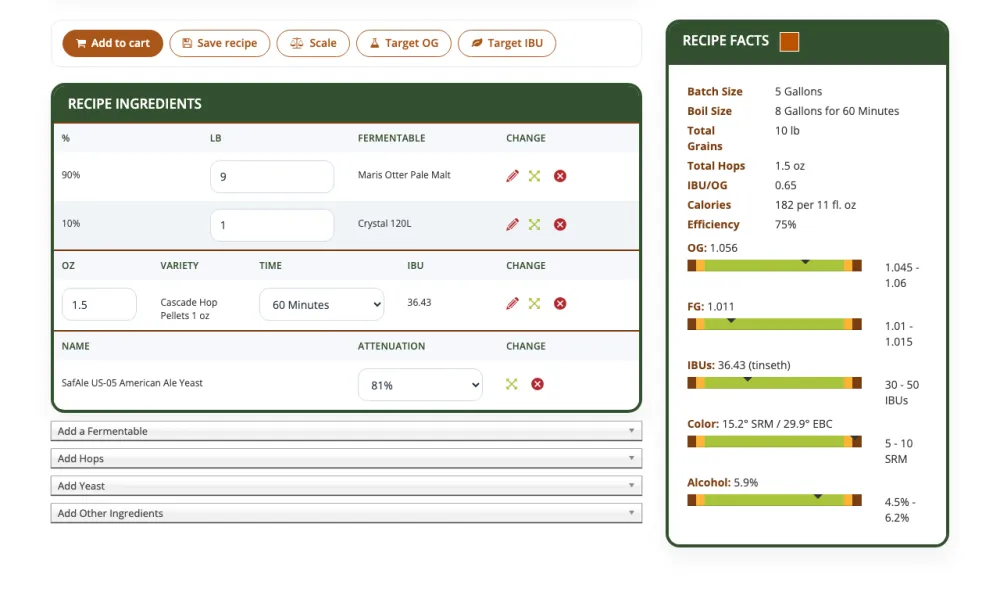
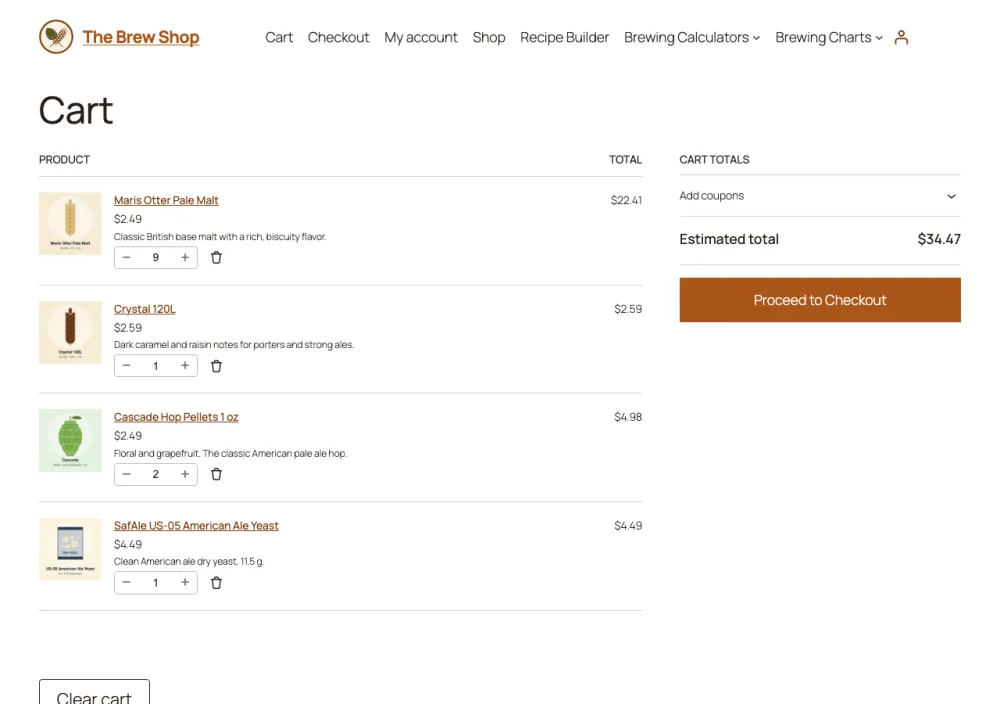
The demo shop runs WordPress, WooCommerce and this plugin. Add to cart fills its cart.
1. Install the plugin
The plugin needs WordPress 6.3 or later and PHP 7.4 or later. WooCommerce is only needed for Add to cart.
The plugin is in review for the WordPress.org Plugin Directory and can't be installed from your dashboard yet. Contact us and we'll tell you when it's listed.
- In your WordPress admin, go to Plugins > Add New Plugin.
- Search for CaptainBrew Homebrew Calculators.
- Click Install Now, then Activate.
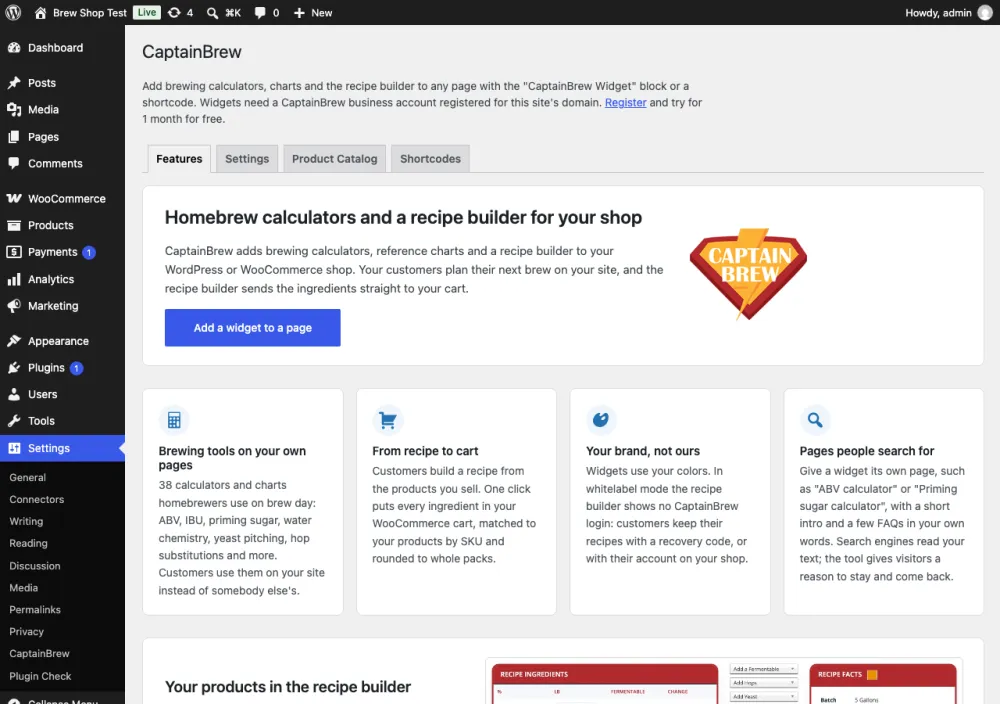
The plugin adds a page under Settings > CaptainBrew with four tabs: Features, Settings, Product Catalog and Shortcodes.
2. Register your shop
Widgets only load on the domain registered in an activated Captain Brew business account.
- Create a business account with your shop name and your site's domain, for example
yourshop.com. www and no www count as the same site. - Click the activation link in the email Captain Brew sends you. Your free month starts.
- Open Settings > CaptainBrew in WordPress. It shows Connected as your shop, with the date your trial ends.
You don't paste anything into the plugin: Captain Brew finds your account from your site's domain, and the plugin fills in your Client ID by itself.
3. Connect from Settings > CaptainBrew
Connecting lets you change your widget colors and registered domain, and import your products, without leaving WordPress. Widgets load without it.
- Go to Settings > CaptainBrew and open the Settings tab.
- Click Connect to CaptainBrew.
- Log in to the business portal and approve the site. You are sent back to WordPress.
The Settings tab then shows your colors (titles, buttons and recipe cards) and your domain. What you save there is saved to your Captain Brew account. On the same tab:
- Hide CaptainBrew login and sign-up in the recipe builder turns on whitelabel mode. Customers keep a recipe with a recovery code instead of a Captain Brew account.
- Keep recipes for customers who are logged in to your site keeps their recipes for their next visit. Captain Brew only gets an anonymous ID, never a name or email.
- Show the title and subtitle inside each widget: turn it off if your page has its own heading.
Disconnect from the plugin or from the business portal at any time.
4. Import your products and turn on Add to cart
Skip this step if you only want calculators and charts. The recipe builder uses your products once you import them; until then it shows Captain Brew's general ingredient list.
Import your catalog
- Open the Product Catalog tab and click Download the sample workbook.
- Fill in one sheet each for malts and extracts, hops, yeasts and other ingredients, with the brewing values the calculations need.
- Put each product's WooCommerce SKU in the
productIdentifiercolumn, so Add to cart finds the right product. - Choose the workbook (.xlsx) and click Import into CaptainBrew.
Importing replaces your Captain Brew catalog with the workbook: products missing from it are removed from the recipe builder. Your WooCommerce products are not changed. You can also import the workbook in the business portal.
If some identifiers in Captain Brew differ from your SKUs, add one line per product under Product IDs in CaptainBrew that differ from your WooCommerce SKUs, such as PALE-MALT-2LB = MALT-001. The right-hand side can be a SKU or a product ID.
Turn on Add to cart
- In the Settings tab, under WooCommerce add to cart, tick Show "Add to cart" in the recipe builder.
- Under After adding, choose whether customers stay on the page, with a message and an updated cart icon, or go to the cart page.
Going to the cart page leaves the recipe builder, so a recipe the customer has not saved is lost. Staying on the page keeps it.
5. Add widgets with the block or a shortcode
In the block editor
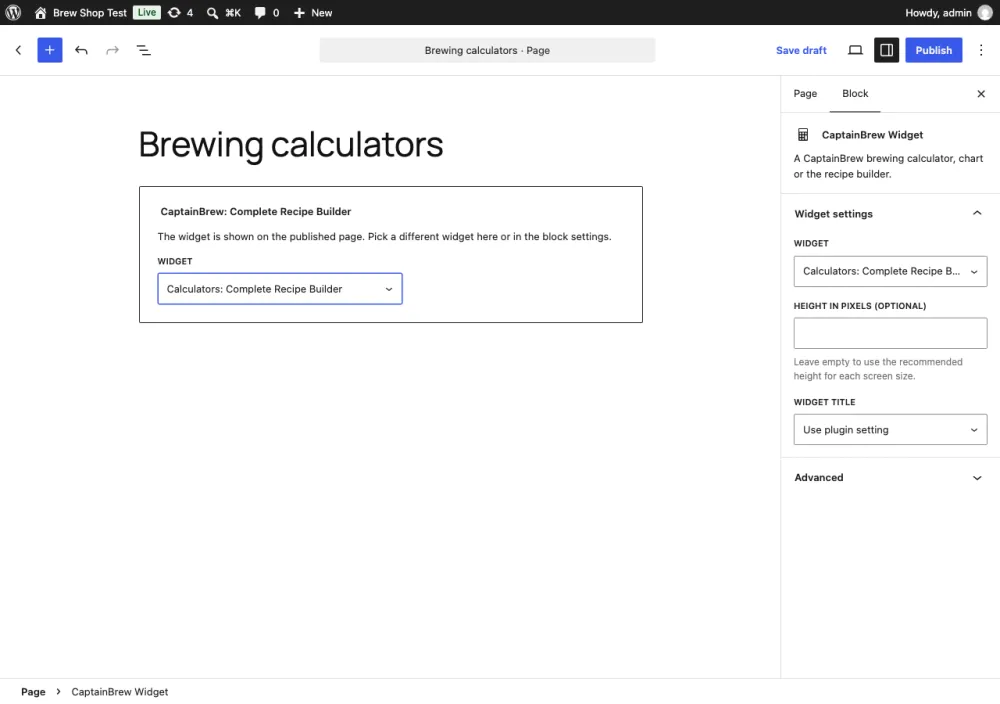
- Open a page, for example a new Brewing calculators page, and add the CaptainBrew Widget block.
- Pick a widget. Leave Height in pixels empty to use the recommended height for each screen size.
- Publish the page. The widget shows on the published page.
Anywhere else: a shortcode
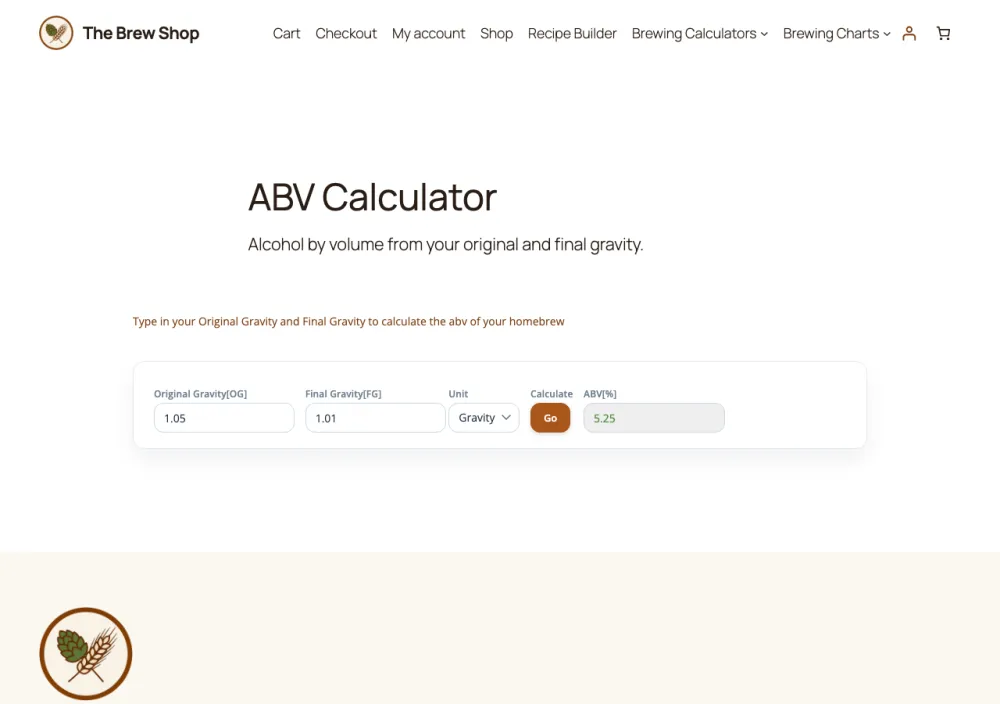
In the classic editor, page builders and text widgets, paste a shortcode. The Shortcodes tab lists every widget with a Copy button.
[captainbrew widget="abv-calculator"]Add these inside the shortcode to change one widget. Without them, the widget follows the Settings tab.
| Option | What it does | Example |
|---|---|---|
widget | Required: the widget to show. | widget="recipe-builder" |
height | A fixed height in pixels. By default the height adapts to the screen width. | height="900" |
title | Show (yes) or hide (no) the widget's title and subtitle. | title="no" |
whitelabel | Recipe builder only: hide (yes) or show (no) the CaptainBrew login and sign-up. | whitelabel="yes" |
Put a calculator where it sells
Calculators work best next to the products they are about: the IBU calculator on a hops page, the priming sugar calculator next to bottling supplies. You can also give a widget its own page, such as "ABV calculator", with a short intro and a few questions in your own words. Search engines read your text; the tool gives visitors a reason to stay and come back.
Questions from WordPress shop owners
Is the plugin free?
The plugin is free to install. The widgets it shows need a Captain Brew business account for your shop's domain: the first month is free, then it is $25 per month for all 38 widgets, with no setup fee.
Do I need WooCommerce?
Only for Add to cart. The calculators, charts and recipe builder work on any WordPress site. With WooCommerce active, the recipe builder can put a recipe's ingredients in your cart.
Do I have to paste a Client ID or API key into the plugin?
No. Captain Brew finds your account from your site's domain, and the plugin fills in your Client ID by itself. Connecting the site is only needed to change your colors and domain, or import your catalog, from WordPress.
How are ingredients matched to my products?
By SKU. Each ingredient's productIdentifier in your Captain Brew catalog is looked up as a WooCommerce SKU, for simple products and variations. If your identifiers differ from your SKUs, map them in the Product Catalog tab. Ingredients that are not found, are out of stock or cannot be bought are listed to the customer, and the rest are added.
The widget shows Forbidden. What's wrong?
Widgets only load on the domain registered in your Captain Brew business account, once it is activated and while your trial or subscription is active. Settings > CaptainBrew shows which of these applies. If it still fails, email [email protected].
Does it work with page builders and the classic editor?
Yes. In the block editor, use the CaptainBrew Widget block. Anywhere else, such as the classic editor, page builders and text widgets, paste a shortcode from the Shortcodes tab.
Can I change the colors?
Yes. Once the site is connected, set your colors in the Settings tab of Settings > CaptainBrew. You can also set them in the business portal under Settings > Branding. They apply to every widget on your site.
Not on WordPress? Shopify guide · Embed code for any site · Stuck on a step? Email [email protected].
CaptainBrew
Create recipes, compare brewing tools, and explore a huge library of homebrew knowledge in one place.